PrivateWithEvents Lbl As MSForms.Label Private BZ AsBoolean Private m_NormalPic As StdPicture Private m_HoverPic As StdPicture Private m_DownPic As StdPicture
PublicSub Attach(ByVal IsLabel As MSForms.Label) Set Lbl = IsLabel SelectCase Lbl.Name Case"Label1" Set m_NormalPic = myplayer.Image1.Picture Set m_HoverPic = myplayer.Image2.Picture Set m_DownPic = myplayer.Image3.Picture Case"Label2" Set m_NormalPic = myplayer.Image4.Picture Set m_HoverPic = myplayer.Image5.Picture Set m_DownPic = myplayer.Image6.Picture Case"Label3" Set m_NormalPic = myplayer.Image7.Picture Set m_HoverPic = myplayer.Image8.Picture Set m_DownPic = myplayer.Image9.Picture EndSelect With Lbl .Picture = m_NormalPic .PicturePosition = fmPicturePositionCenter EndWith EndSub
PrivateFunction IsInCircle(ByVal X AsSingle, ByVal Y AsSingle) AsBoolean Dim r AsSingle, cx AsSingle, cy AsSingle r = Lbl.Width / 2 cx = r cy = r IsInCircle = (Sqr((X - cx) * (X - cx) + (Y - cy) * (Y - cy)) <= r) EndFunction
PrivateSub SetPicture(ByVal State AsInteger) SelectCase State Case0: Lbl.Picture = m_NormalPic Case1: Lbl.Picture = m_HoverPic Case2: Lbl.Picture = m_DownPic EndSelect EndSub
PrivateSub Lbl_MouseDown(ByVal Button AsInteger, ByVal Shift AsInteger, ByVal X AsSingle, ByVal Y AsSingle) If Button = 1And IsInCircle(X, Y) Then BZ = True SetPicture 2 EndIf EndSub
PrivateSub Lbl_MouseMove(ByVal Button AsInteger, ByVal Shift AsInteger, ByVal X AsSingle, ByVal Y AsSingle) ActLabel = Lbl.Name If IsInCircle(X, Y) Then If BZ Then SetPicture 2 Else SetPicture 1 EndIf Else SetPicture 0 EndIf EndSub
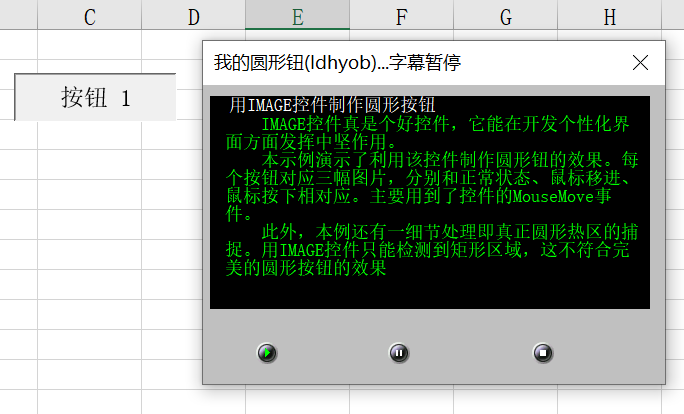
PrivateSub Lbl_MouseUp(ByVal Button AsInteger, ByVal Shift AsInteger, ByVal X AsSingle, ByVal Y AsSingle) IfNot BZ ThenExitSub BZ = False IfNot IsInCircle(X, Y) Then SetPicture 0 ExitSub EndIf SetPicture 1 SelectCase Lbl.Name Case"Label1" IfNot flag Then flag = True TID = SetTimer(0, 0, 200, AddressOf checktime) myplayer.Caption = "我的圆形钮(ldhyob)...字幕播放中" EndIf Case"Label2" If flag Then flag = False KillTimer 0, TID TID = 0 myplayer.Caption = "我的圆形钮(ldhyob)...字幕暂停" EndIf Case"Label3" Unload myplayer EndSelect EndSub
For n = 1To3 Mylbl(n).Attach Me.Controls("Label" & n) Next n
这样一套事件代码即可管理任意数量的按钮,扩展时只需增加数组大小和对应图片。
3. 图片缓存与三态切换
每个按钮在初始化时缓存三种状态的图片引用:
1
2
3
Private m_NormalPic As StdPicture ' 正常态 Private m_HoverPic As StdPicture ' 悬停态 Private m_DownPic As StdPicture ' 按下态
切换时直接赋值,避免每次都通过控件名查找图片,提升性能并简化代码。
4. Windows API 定时器
VBA 没有内置的高精度定时器,本项目使用 Windows API 的 SetTimer 和 KillTimer 实现 200 毫秒间隔的字幕滚动:
1
TID = SetTimer(0, 0, 200, AddressOf checktime)
定时器回调函数 checktime 每次截取文本的前 N 个字符显示,形成逐字展开的动画效果。
5. 64位兼容处理
通过条件编译指令区分 32位和 64位环境:
1 2 3 4 5 6 7
#If VBA7 Then PublicDeclare PtrSafe Function SetTimer Lib"user32" (...) Public TID As LongPtr #Else PublicDeclareFunction SetTimer Lib"user32" (...) Public TID AsLong #EndIf